n8n WhatsApp Automation in India: A Practical Lead Follow-Up Workflow
Connect an enquiry form, your CRM and the official WhatsApp Cloud API without turning every new phone number into an unsolicited message.
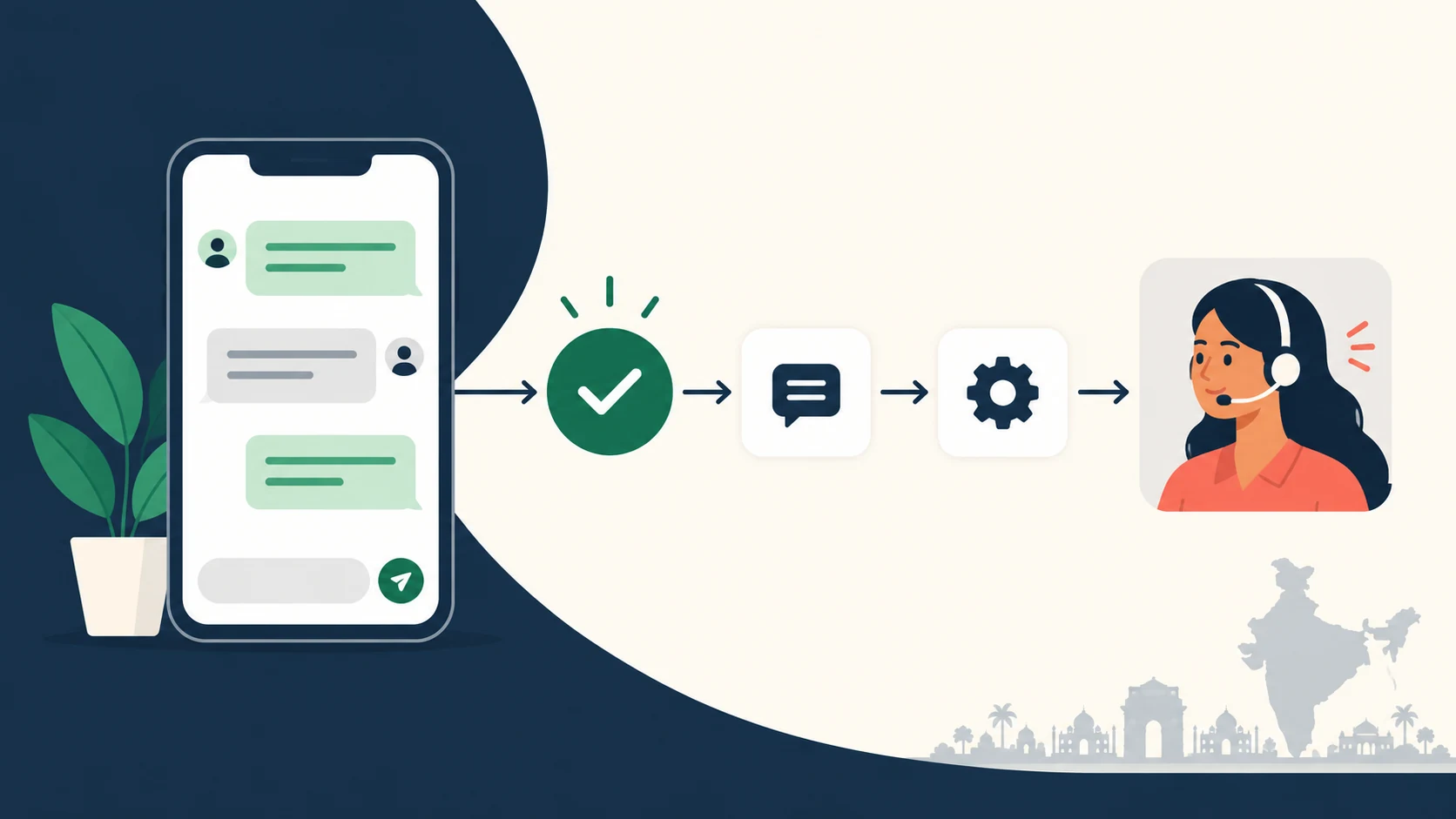
Implementation note: This is a documentation-based reference architecture, not a live-tested end-to-end integration. No live messages were sent while preparing this guide.
A customer asks an Indian service business for a quotation at 8 pm. Their details reach a spreadsheet, but nobody sees the row until the next morning. A useful automation can capture that enquiry, assign an owner and send the customer the response they asked for. A careless one can send a promotional message to the wrong person, repeat it twice or continue after they ask to stop.
This guide describes a small, controlled n8n workflow for website leads who have agreed to receive WhatsApp follow-ups. It uses the official WhatsApp Business Cloud integration, a contact record and a delivery log. Start with one enquiry type and one approved message before adding AI or a multi-step sales sequence.
What you are building
The workflow has three jobs: record a legitimate enquiry, decide whether a message is permitted, and give the team an accurate outcome. The example is a quotation request for a local service business. It is not a bulk-messaging system, a scraped-number campaign or a promise that WhatsApp will approve a business account.
Use a form or CRM event as the entry point, n8n as the coordinator, a database as the durable record, and the Cloud API as the messaging channel. Keep a human owner for enquiries that need a price, availability check or unusual answer. n8n’s official node supports ordinary messages and template messages, so both routes can sit inside one workflow. n8n WhatsApp node documentation
1. Prepare the account and credentials
Have the Meta developer account, business portfolio and WhatsApp-configured business app ready. Follow the current onboarding instructions for your account rather than assuming that a WhatsApp Web login supplies API access.
In n8n, the WhatsApp Business Cloud sending node uses API-key credentials containing an access token and Business Account ID. The WhatsApp Trigger uses a separate OAuth2 credential with the app’s Client ID and Client Secret. n8n documents these as different authentication paths. Store secrets in credentials, not in a spreadsheet, article screenshot or exported workflow. n8n WhatsApp credential documentation
Complete a test send to a permitted test recipient first. Then check the production number, account permissions, token lifecycle and template access before switching on the lead workflow. Do not migrate a business’s existing number or change its app setup without understanding the effect on the team currently answering chats.
2. Record permission with the lead
A supplied phone number alone is insufficient: WhatsApp’s policy requires opt-in for subsequent contact. It also requires businesses to honour opt-outs. For this workflow, keep evidence of what the person agreed to receive from your named business. WhatsApp Business Messaging Policy
A practical form checkbox could read: “I agree to receive WhatsApp messages from Example Studio about this quotation request. I can ask to stop at any time.” Treat that as example wording to adapt to your actual purpose and privacy notice, not a universal legal template. Keep promotional updates separate from a requested quotation response.
Store a stable lead ID, normalized phone number, consent purpose, consent timestamp, form version, preferred language and assigned owner. Add an opt-out flag and the latest inbound WhatsApp-message timestamp. A timestamp saying when the form was submitted is not a substitute for the timestamp of the customer’s WhatsApp message.
For Indian numbers, normalize the country code consistently instead of blindly adding 91 to every input. Reject incomplete numbers, retain the customer’s chosen language, and schedule non-urgent follow-ups during the business’s stated IST hours. These are design choices for a cleaner customer experience, not a way to expand messaging permission.
3. Decide between a reply and an approved template
On the Business Platform, a customer message opens or resets a 24-hour service window. Within that window, a business can reply without a template; outside it, an approved template is required. Initiating a conversation also requires an approved template. Automation should provide a clear route to a human. WhatsApp Business Messaging Policy
Build that decision before composing the message. A person who submitted a website form has not necessarily opened a WhatsApp service window. Similarly, your own outbound message does not reset the timer. If the inbound timestamp is missing or unreliable, do not invent an open window. Twilio WhatsApp key concepts
Map the approved template name, language and variables explicitly. For example, a quotation acknowledgement might use the customer’s name and enquiry reference, without inserting an unrelated discount. Use the category approved for the actual content; do not assume every follow-up qualifies as a utility message.
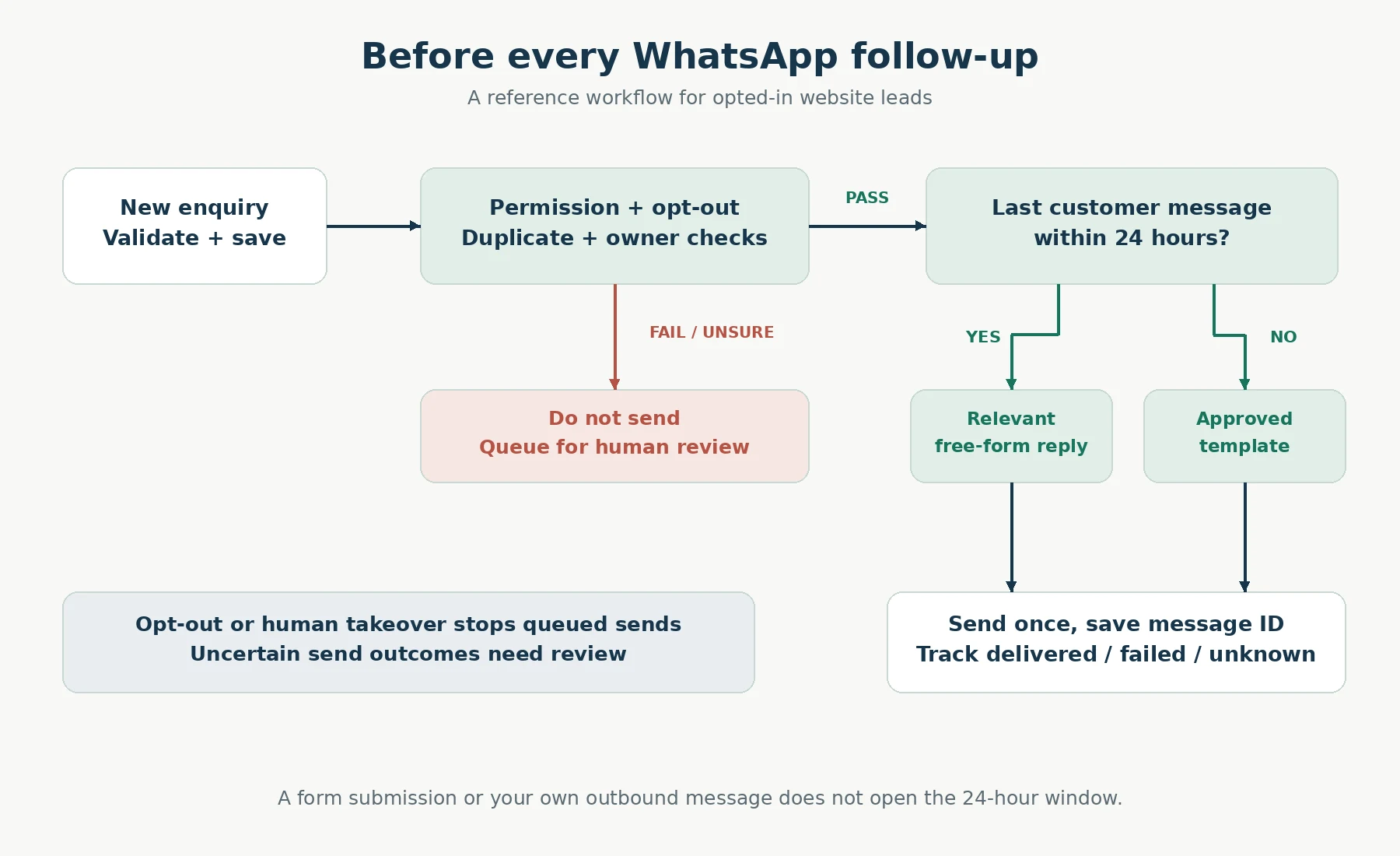
A reference decision flow for opted-in website leads. Recheck the gates immediately before sending.
4. Assemble the workflow in n8n
Intake: receive the form or CRM event through the appropriate trigger. Validate the required fields, authenticate the source and write the enquiry to a durable store. Keep the original event ID so a retried submission can be recognized.
Eligibility: fetch the latest contact record. Stop if the permitted purpose is missing, an opt-out is recorded, the enquiry has closed or a human has taken ownership. Check again immediately before a delayed send; a customer may opt out while a message is waiting.
Duplicate protection: create a unique key for the enquiry and intended message step. A database uniqueness constraint is more reliable than a separate “look up, then insert” sequence when executions overlap. PostgreSQL’s INSERT with ON CONFLICT provides the building block for claiming a unique record. PostgreSQL INSERT documentation
Route and send: choose the free-form reply or approved-template branch using the last customer-message timestamp. Map only the minimum fields needed for the response. Begin with reviewed fixed wording; there is no need for an LLM to generate a simple acknowledgement.
Record the outcome: save the provider message ID and distinguish accepted, delivered, failed and unknown states. If an API response is uncertain, investigate that state before blindly retrying. Duplicate protection at intake cannot, by itself, guarantee that an external send happens exactly once.
Finally, add an exception path that assigns the enquiry to a person. A failed send should remain visible in the CRM rather than disappearing because the main workflow stopped.
5. Track delivery, not just a green execution
A workflow completing successfully is not the same as the customer receiving a message. n8n’s own WhatsApp bot guide describes message-related webhook events, including delivery and read updates. Use those events to update the outbound record where available. n8n WhatsApp bot guide
A small operational view needs the lead reference, owner, last send attempt, provider message ID, latest status and next action. Keep failure reasons readable: invalid destination, template problem, permission problem or an outcome that still needs checking. Avoid exposing full phone numbers or message contents in general-purpose alert channels.
Use bounded retries for temporary failures. For a bad template or invalid number, correct the underlying issue rather than repeatedly submitting the same request. When the customer asks for a person, pause automated replies for that conversation and show the assigned team member what is pending.
6. Estimate the cost for an Indian business
Budget for separate components: WhatsApp message charges, n8n hosting or subscription, any provider or shared-inbox fee, database operations, and optional AI usage. “Self-hosted” does not make the whole system free.
Meta’s current pricing page describes charges per delivered message, varying by recipient market and message category. It lists service messages as free and describes other exceptions and volume tiers. Check the live India rate card for the exact category and billing currency you will use; do not reuse an old “per conversation” quote. WhatsApp Business Platform pricing
For an internal estimate, multiply expected chargeable delivered messages in each category by its applicable rate, then add the other service costs and applicable taxes. For example, 300 opted-in leads with one initial template each give a starting ceiling of 300 initial template deliveries to model, not a prediction of billable totals. Replies, failed delivery, later follow-ups and category rules change the actual amount.
Set a daily send cap for the pilot, review the delivery log and reconcile it with the provider’s billing view. Do not publish a fixed rupee cost per lead until you have measured your own workflow.
7. Test the awkward cases before launch
Use a separate test setup where possible. n8n warns that switching between test and production webhook URLs can overwrite the registered callback. Its current Trigger guide also distinguishes registering a callback from subscribing the app to the WhatsApp Business Account. A successful dashboard test therefore does not prove real customer events will arrive. Check both before diagnosing every missing message as a workflow bug. n8n WhatsApp Trigger documentation
No permission: submit a lead without the WhatsApp checkbox. The CRM record may be created, but this follow-up should not be sent.
Duplicate event: deliver the same form event twice, including concurrently. Confirm that only one message step is claimed.
Window boundary: test a recent customer message, a timestamp older than 24 hours and no inbound timestamp.
Opt-out while waiting: queue a message, record an opt-out, then let the queue resume. The send should be suppressed.
Human takeover: assign the conversation to staff and verify that automation stays quiet.
Template mismatch: test missing variables, wrong order and language. n8n recommends checking parameter types and mapping when Send Template returns a bad request. n8n WhatsApp troubleshooting guide
Uncertain send: simulate an interrupted response and verify that the workflow flags the outcome instead of sending another message automatically.
Record the expected and actual result for every case. Passing a test send is only the beginning; the useful evidence is whether the workflow behaves correctly when the lead data, timing or delivery state changes.
Frequently asked questions
Can I use my WhatsApp Web session as the n8n Cloud API credential?
No. This design uses the official API credentials described above. A browser session is not the documented authentication method for n8n’s WhatsApp Business Cloud node.
Does an approved template replace opt-in?
No. Template approval and permission to contact a particular recipient are separate checks. Keep both in the workflow.
Should I add AI to the first version?
Only when it solves a specific problem. Start with fixed acknowledgements and human handling. Later, AI might summarize an enquiry or suggest a reply, but it should not invent a quotation, available appointment or contractual promise.
Can this guarantee delivery or avoid account restrictions?
No. Account status, policy compliance, recipient behaviour and delivery conditions still matter. Monitor the actual outcomes and keep a manual fallback.
A sensible first rollout
Pick one enquiry form, one permission statement and one narrowly scoped message. Run it with a small set of consenting testers, check every outcome and let the team handle the next step. Expand only after the stop rules, template path, delivery tracking and ownership changes behave as intended.
For a business selling a digital product as well as handling enquiries, payment confirmation belongs in a separate verified flow. The related Lovable–Razorpay integration guide explains that architecture. Keep messaging permission and payment state as distinct records.