Lovable Razorpay Integration: Accept UPI Payments in India with Supabase
Connect Razorpay to a Lovable app using Supabase. Learn secure order creation, payment verification, webhooks, UPI flows, and a practical testing checklist.

A Lovable Razorpay integration can let customers pay for your app through supported UPI flows while Supabase handles authentication, order records, and payment verification. The essential design decision is to keep payment authority on the backend. A browser can open checkout, but it must never decide the price or grant paid access.
This guide covers one-time INR purchases by signed-in users. It describes a custom integration, not a native Razorpay payment option in Lovable.
Implementation disclosure: This is a documentation-based implementation guide, not a tested reference application. The prompts and architecture below have not been deployed or validated against a live merchant account. Review and test generated code before accepting customer payments.
How Lovable and Razorpay fit together
Lovable’s built-in payments documentation currently names Paddle and Stripe. For Razorpay, use a custom integration that you maintain: Lovable builds the interface, Supabase runs trusted backend functions, and Razorpay processes checkout. Lovable documents both external API integrations and connecting your own Supabase project.
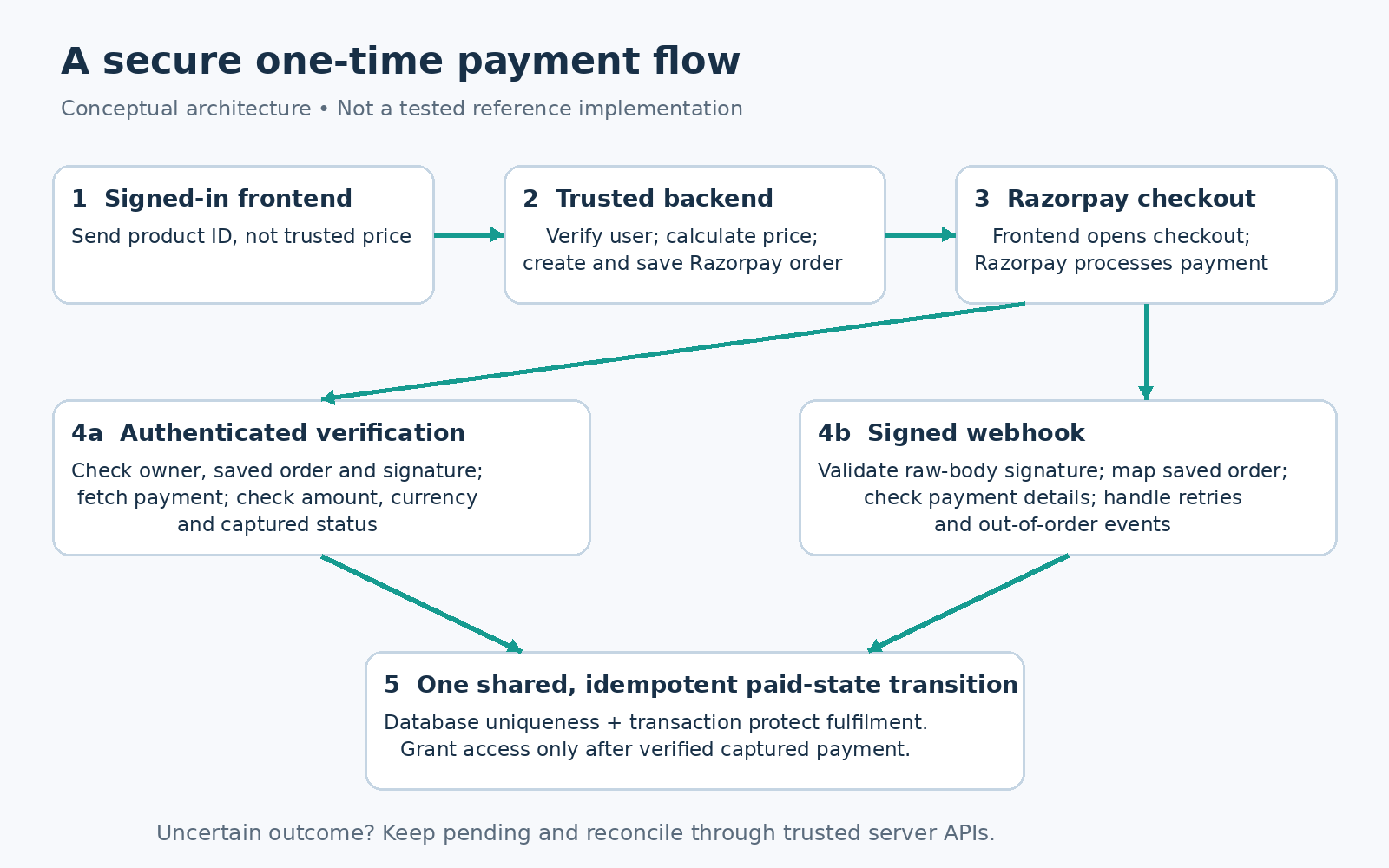
The payment flow is:
A signed-in customer selects a product.
A Supabase Edge Function creates a Razorpay order using your server-side price.
The frontend opens Razorpay Standard Checkout with that order ID.
Your backend verifies the result and records confirmed payment.
A signed webhook and reconciliation process recover missed or delayed updates.
Prepare your backend and secrets
Start with a connected Supabase project, Supabase Auth, and a Razorpay account with Test Mode credentials. Live payments require the provider’s account activation and applicable verification, not just replacing a key. Check the requirements shown in your account before launch. Razorpay activation guidance
Store RAZORPAY_KEY_SECRET and a separate RAZORPAY_WEBHOOK_SECRET in Supabase Edge Function secrets. Keep privileged Supabase credentials server-side too. Never place secrets in frontend environment variables, public repositories, logs, or ordinary prompts. Razorpay’s Key ID is intended for checkout; the Key Secret is not.
This guide assumes an existing external Supabase connection. Lovable warns that switching between its built-in backend and your own Supabase project is not automatic. Avoid introducing a backend migration merely to follow a payment tutorial. Lovable Supabase documentation
Design records before adding the Pay button
Create a server-managed purchase record containing an internal ID, authenticated owner ID, product/version, expected amount in paise, currency, Razorpay order ID, payment ID, status, and timestamps. Keep payment attempts separately when one purchase can have multiple attempts.
For a full-payment-only flow, disable partial payments. Snapshot the payable amount, including applicable discounts and taxes, so later catalogue changes do not alter an existing purchase.
Enable Row Level Security and narrow database grants. Customers may read their own purchases, but must not edit price, payment status, ownership, or entitlements. Use trusted backend code for those writes. A service-role client bypasses RLS, so every privileged function still needs explicit authorization checks. Supabase RLS documentation
Create orders on an authenticated server
Let the frontend send a product identifier and a purchase-attempt token, not a trusted amount or user ID. The Edge Function should:
Verify the user’s session and derive their identity from the verified token.
Load the product and calculate the allowed price on the server.
Validate quantity, eligibility, currency, and any discount.
Persist the purchase intent, call Razorpay’s Orders API, and save the returned order ID.
Return only the checkout fields the browser needs.
Use integer currency subunits: ₹499 is 49,900 paise. Razorpay requires server-side order creation and passing the resulting order ID into checkout. Standard Checkout integration
Use explicit user authentication inside the function. Supabase’s platform JWT setting alone is not a substitute for checking a signed-in user; current documentation notes compatibility paths for API keys. Add rate limits and input validation. CORS configuration is not authentication. Supabase function authentication and authorization headers
Open checkout and verify the payment
Load Razorpay’s official checkout script and use the server-issued order ID, Key ID, amount, and currency. On completion, send razorpay_payment_id, razorpay_order_id, and razorpay_signature to an authenticated verification function.
First load the purchase and check that the signed-in user owns it. Reject a submitted order ID that does not match the saved order. Compute the checkout signature as HMAC-SHA256 of the saved Razorpay order ID, a vertical bar, and the payment ID, using the Razorpay Key Secret. Use a vetted verification helper or constant-time comparison. Never substitute an untrusted browser order ID when constructing the signed message. Signature verification guide and Razorpay security checklist
A valid signature does not replace checking the payment record. Fetch it server-side and verify its order ID, expected amount, currency, and captured status. Grant access only after those checks pass. Keep an authorized-but-uncaptured payment pending, and configure capture deliberately. Fetch a payment
Verify webhooks and fulfil each purchase once
The customer may close the browser before verification finishes. Configure relevant events, such as payment.captured, to reach a dedicated HTTPS webhook function.
Razorpay does not send a Supabase user JWT. Configure this endpoint to accept the provider’s request, then authenticate it with Razorpay’s signature. Do not disable user authentication on your order endpoints. Supabase external webhook guidance
Read the original request body before parsing JSON. Validate X-Razorpay-Signature using HMAC-SHA256 over that unchanged body and your webhook secret, which is separate from the API Key Secret. Reject invalid signatures before making payment-state changes. Handle secret rotation so legitimate retries signed with the previous secret can still be checked. Razorpay webhook validation
After validation, map the payment to the saved order and repeat the amount, currency, and payment-state checks. Resolve ownership from your database, not webhook notes supplied during checkout.
For durable idempotency, store x-razorpay-event-id with a database uniqueness constraint. In one transaction, record processing, update the purchase, and create a uniquely keyed entitlement or fulfilment job. Event deduplication alone is insufficient: a browser callback and two different events could describe the same payment. Enforce uniqueness at the purchase or payment level too. An in-memory set disappears when a function restarts.
Route browser verification and webhooks through the same idempotent paid-state transition. This is an application design to implement and test, not a provider guarantee of exactly-once fulfilment.
For emails or other external actions, persist an outbox job and process it with retry-safe logic. Return success after durable handling or durable queueing, not before. Razorpay can deliver duplicates and events out of order. Webhook best practices
Handle failures without losing valid payments
Show “Payment confirmation pending” when the outcome is uncertain. A dismissed checkout or interrupted browser does not prove failure. Reconcile unresolved purchases against Razorpay’s server APIs and apply the same verification and idempotency rules.
Persist an idempotent purchase-attempt key to prevent double-clicks creating parallel purchases. If an order-creation request times out, investigate the ambiguous result before blindly creating another order. Alert on repeated webhook failures and stale pending payments. Keep refunds and disputes as separate lifecycle events; an older failed event must not overwrite a captured payment.
Use current UPI flows
Razorpay’s current migration documentation says UPI Collect was deprecated from 28 February 2026, with exceptions including iOS mobile app/mobile web transactions and certain specialist use cases. Do not build a new checkout around manually entering a UPI ID.
For Standard Checkout, follow Razorpay’s configuration to hide Collect where required. Desktop web uses UPI QR; supported mobile-web flows use UPI Intent. Mobile-web QR may require account enablement. Test the actual devices and browsers your customers use rather than promising every UPI app on every platform. Official UPI migration guidance
Test before switching to live payments
Use separate Test and Live credentials, webhook configuration, and data boundaries. Your checklist should include:
Simulated success, failure, checkout dismissal, and delayed confirmation.
Modified prices, forged signatures, and another user’s order ID.
Duplicate callbacks, repeated webhooks, and reversed event order.
Function restarts and database errors without duplicate access grants.
Captured payments recovered after the customer closes the page.
Rejected client-side writes to payment and entitlement records.
Razorpay documents simulated UPI outcomes in Test Mode, but specifies Live Mode for UPI Intent and QR testing. A sandbox pass therefore does not prove the real app-switching or scan-to-pay experience. After activation, arrange a separately approved, controlled live validation. Razorpay testing guidance
A focused prompt for Lovable
“Build a custom one-time Razorpay checkout using our connected Supabase project. Require authenticated server-side order creation with catalogue-derived prices. Keep secrets backend-only. Add ownership and amount checks, checkout-signature verification, captured-payment validation, raw-body signed webhooks, database-backed idempotency, and pending-payment reconciliation. Prevent client writes to payment status or entitlements. Show the schema, security assumptions, and test plan before implementation.”
Review each generated component against the requirements above. Recurring subscriptions, refunds, split payments, tax invoicing, and merchant onboarding require additional workflows. A Pay button alone does not implement them.